How to Clean Up Messy Books: A Step-by-Step Guide for Founders
Behind on bookkeeping? Here's the exact, no-jargon process accountants use to turn scattered statements and spreadsheets into clean, decision-ready books — with examples, a checklist, and how to do it 10x faster.
Abrar Masum
ZeroFin

If your books are behind, every financial decision becomes a guess. The good news: cleaning them up is a process, not a mystery. This guide walks through the exact sequence accountants use — with examples — and shows how to do it in a fraction of the time with AI assistance.
The short answer
To clean up messy books: gather every financial record, reconstruct transactions chronologically, map them to a chart of accounts, reconcile each account, set clean opening balances, review anything uncertain, and finally generate your core reports. Do those seven things and you go from “I think” to “I know.”
Key takeaways
- Messy books are an organization problem, not a math problem — the data exists, it's just unstructured.
- Cleanup follows 7 repeatable steps; skipping reconciliation is the most common mistake.
- Never guess on uncertain transactions — flag and review them.
- AI-assisted reconstruction turns days of data entry into hours of review.
Why books get messy (it's not your fault)
You started the company to build and sell — not to file receipts. Finance data piles up in the background: bank statements, invoices, vendor bills, a spreadsheet, an old QuickBooks export, receipts as phone photos. None of it is wrong. It's just unstructured. The problem isn't the data; it's that nothing has turned it into trusted numbers yet.
The hidden cost of waiting
Messy books don't just cost time. They cost leverage — investors discount numbers they can't verify, and you make hiring and spending calls on guesses. And cleanup gets more expensive the longer the backlog grows.
The 7-step cleanup process
- 1
Gather everything
Pull every source of truth: all bank and card statements, sales invoices (paid, unpaid, partial), vendor bills and receipts, payroll, loan schedules, prior accounting exports (QuickBooks, Xero, Tally, Wave), and owner contributions/withdrawals.
- 2
Reconstruct transactions
Go chronologically through your statements and rebuild what actually happened. This is the slowest manual step — and the one AI is best at. In ZeroFin you upload the files and Mr. Accountant drafts the entries for you to review.
- 3
Map to a chart of accounts
Every transaction needs a home: revenue, expense, asset, liability, or equity. A clean chart of accounts is what makes your reports meaningful later.
- 4
Reconcile every account
Match your records to each bank statement until they agree to the penny. Reconciliation is what separates “a list of transactions” from “books you can trust.”
- 5
Set opening balances
Establish a clean starting point — cash, receivables, payables, loans, owner equity — so the present stays accurate going forward.
- 6
Review the exceptions
Don't guess. Flag anything uncertain for review and resolve it deliberately. One wrong assumption compounds across every report.
- 7
Generate your reports
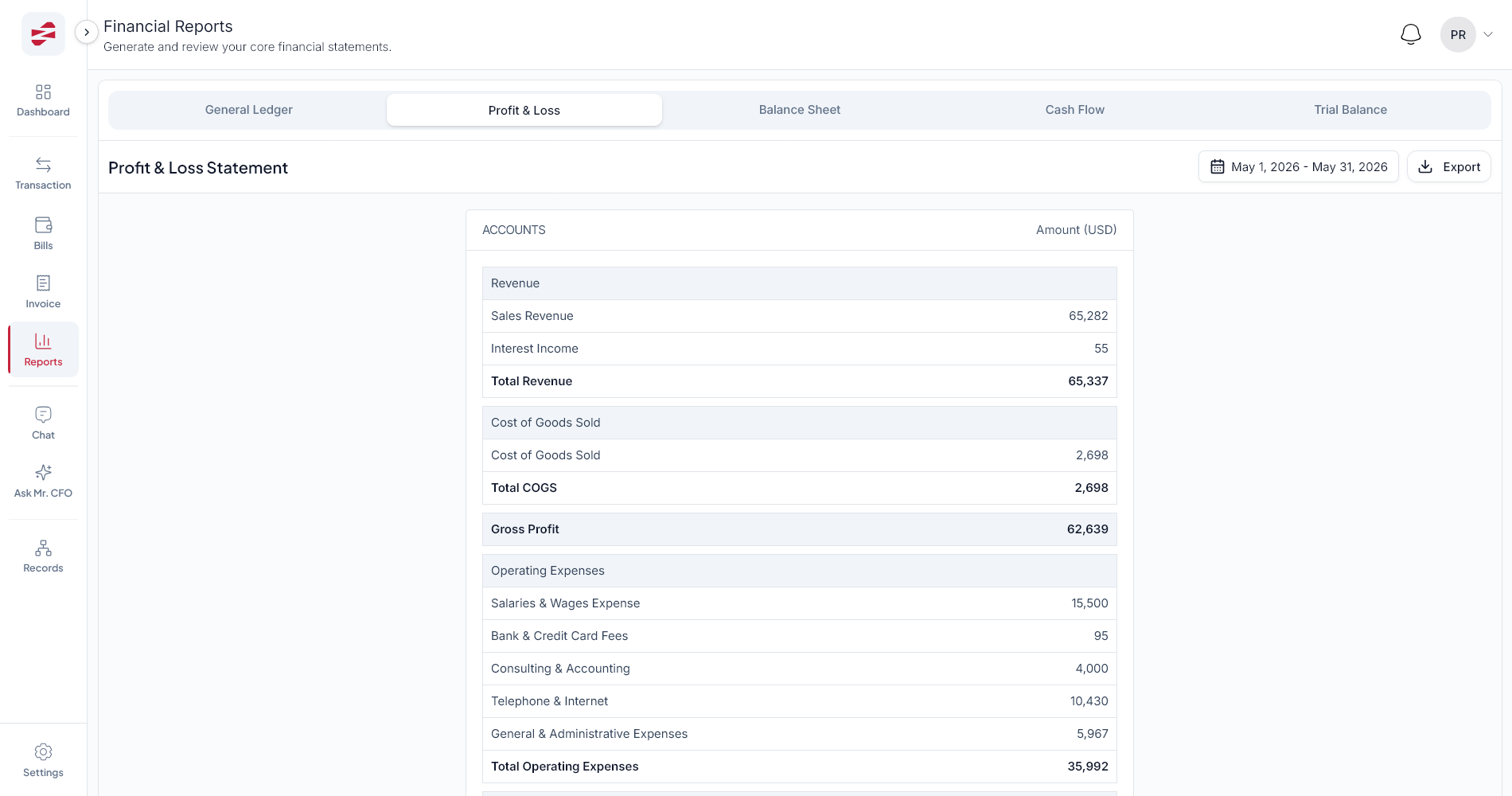
Produce the outputs that drive decisions: P&L, balance sheet, cash flow, and trial balance — from reconstructed, reconciled data.
| Report | Answers the question | Look at it when |
|---|---|---|
| Profit & Loss | Are we making money? | Monthly, and before a raise |
| Balance Sheet | What do we own and owe? | Month-end, tax time |
| Cash Flow | Where did the cash actually go? | Weekly / monthly |
| Trial Balance | Do the books balance? | Before trusting any report |
Manual cleanup vs. AI-assisted: what actually changes
The work is the same seven steps either way. What changes is where your time goes. Manually, you spend it on data entry. With AI assistance, you spend it on judgment — reviewing and approving drafts instead of typing them.
Manual cleanup
- Re-type every transaction by hand
- Categorize one-by-one
- Hunt for context across files
- Days to weeks per year of history
- Error-prone, hard to audit
AI-assisted (ZeroFin)
- Upload files; AI drafts the entries
- Suggested categories you confirm
- Context pulled from documents
- Hours of review per year of history
- Every change tracked in an audit trail
Pro tip
Reconstruct in one period at a time (e.g. quarter by quarter). It keeps the review manageable and lets you sanity-check each P&L against what you remember happening.
Your cleanup checklist
Work through these in order
- All bank & card statements collected (every account, full period)
- Invoices and bills gathered — paid, unpaid, and partial
- Transactions reconstructed chronologically
- Every transaction mapped to the chart of accounts
- Each account reconciled to its statement
- Opening balances set
- Uncertain items flagged and reviewed (not guessed)
- P&L, balance sheet, cash flow, and trial balance generated
How long does cleanup take?
Manually, a year of messy books can take an experienced bookkeeper days to weeks. With AI-assisted reconstruction — where the tool drafts entries and you review — the same work often drops to hours, because you spend your time deciding instead of data-entering.
After cleanup: stay clean, then ask better questions
The reason cleanup hurts is that it's a backlog. Once you're current, a light weekly habit keeps you there: reconcile accounts, record new invoices and bills, and check your dashboard. Then the real payoff arrives — you can finally ask your numbers questions instead of digging for them.
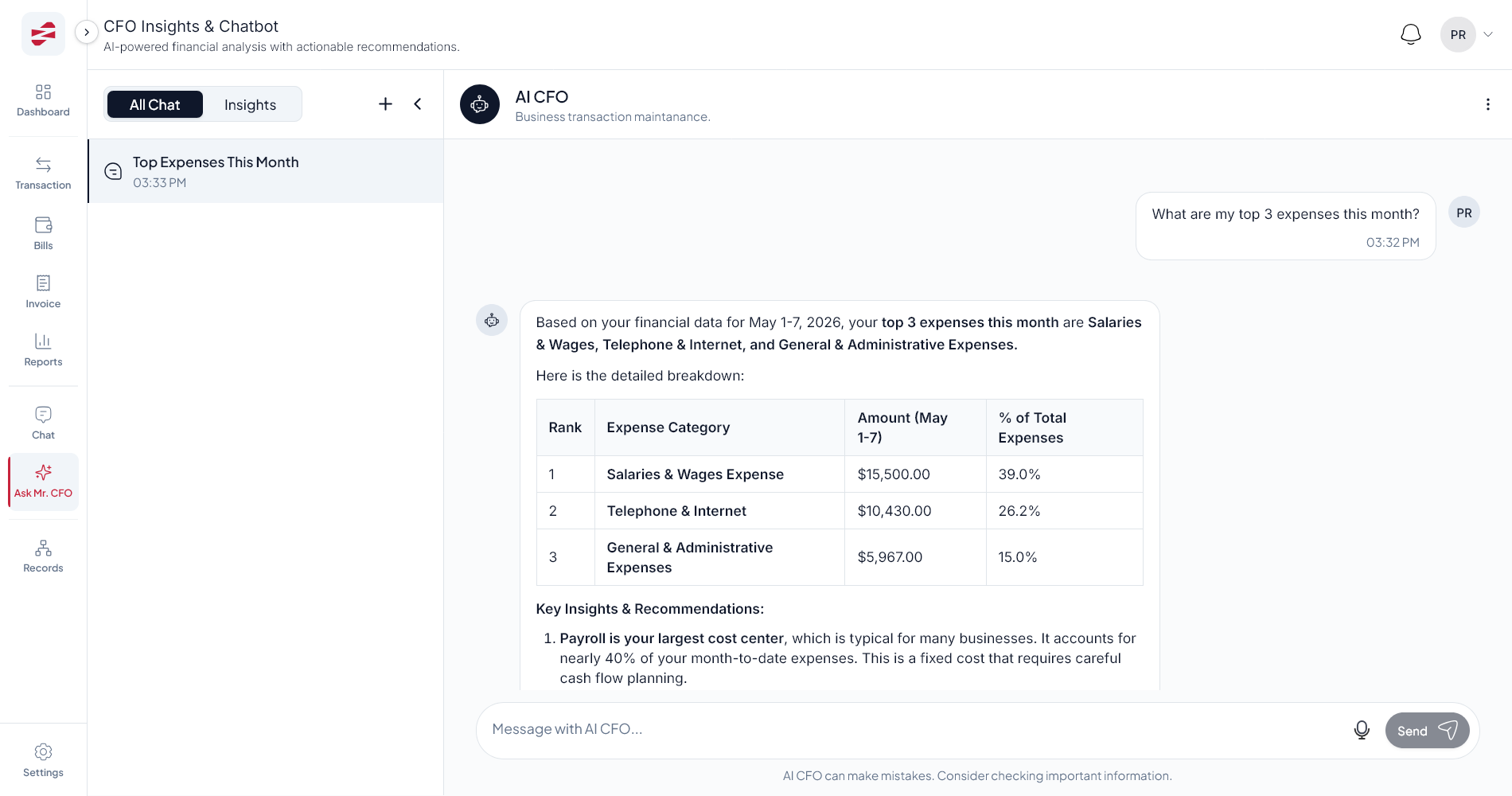
“The goal isn't perfect books for their own sake. It's trusted numbers the moment a real decision lands on your desk.”
Frequently asked questions
How do I clean up messy books?
Gather all bank statements, invoices, bills, receipts, and old exports; reconstruct transactions chronologically; map them to a chart of accounts; reconcile every account; set opening balances; review exceptions; then generate P&L, balance sheet, cash flow, and trial balance.
My books are 2 years behind — is it too late?
No. Even multi-year backlogs can be reconstructed from bank statements and exports. The longer you wait, the more it costs, so the best time to start is now.
Do I need an accountant to clean up my books?
An accountant helps, but modern AI-assisted tools like ZeroFin do the heavy structuring while you or your accountant review and approve — which dramatically cuts cleanup time.
How much does bookkeeping cleanup cost?
Manual cleanup is usually billed by the hour and scales with the backlog. AI-assisted reconstruction lowers the cost because the tool drafts entries and humans review, so you pay for judgment, not data entry.
From messy books to CFO-level clarity
Book a free 20-minute Financial Clarity Diagnosis and see what trusted books look like for your business.
Book a Financial Clarity Diagnosis